Grey Nomads: Turn Your Map Into a Personal Road Trip — Vanlife Savings Spots Explained
Save stops and get directions instantly. No spreadsheets. No sticky notes. No lost bookmarks. This is how smart grey nomads plan their next leg before they leave camp.
Table of Contents
- The Problem Every Grey Nomad Knows (But Nobody Talks About)
- What Is the Vanlife Savings Spots App?
- Why Grey Nomads Need This — Not Just Another Camping App
- How to Save Your First Stop in Under 60 Seconds
- The 5 Types of Stops Every Grey Nomad Should Be Saving
- Logistics: Toilets, Water, and Dump Points — Save Them First
- Safety: Hospitals, Pharmacies, and RFDS — The Stops That Matter Most
- Mobility: Level Ground, Accessible Sites, and Disability-Friendly Stops
- When to Use the App: Before You Leave Town, Not After You’re Lost
- Senior-Specific Tips for Getting the Most From the App
- Telstra Coverage and Offline Use — What You Need to Know
- Common Mistakes Grey Nomads Make With Camping Apps
- Your Quick-Start Checklist: First 10 Stops to Save Right Now
1. The Problem Every Grey Nomad Knows (But Nobody Talks About)
You found the perfect free camp three trips ago. Flat ground. Public toilets 200 metres away. Telstra signal. A servo within walking distance. You meant to write it down. You didn’t. Now you are back on the same stretch of highway — and you cannot remember whether it was before or after the roadhouse turnoff.
This happens to every grey nomad. It is not a memory problem. It is a system problem. The average grey nomad discovers dozens of great stops over a season — free camps, dump points, accessible toilets, cheap fuel stations, reliable pharmacies, and flat parking bays that actually fit a 30-foot rig. They find them by luck, by asking at the roadhouse, or by reading a tip in a forum. Then they lose them just as fast.
The old solutions do not work on the road. Paper notebooks get wet. Spreadsheets require a laptop and wi-fi. Screenshots pile up without any location data attached. Telling your partner “I remember it was somewhere near the servo” is not a navigation plan.
The Vanlife Savings Spots app on the Retire to Vanlife website was built to solve exactly this problem. Not as a social platform. Not as a crowd-sourced review system. As a personal travel map — your map — that you build one saved stop at a time.
2. What Is the Vanlife Savings Spots App?
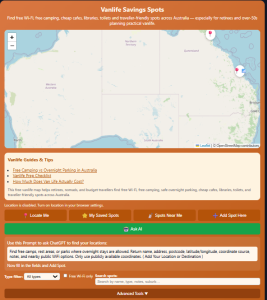
The Vanlife Savings Spots tool is a location-saving system built specifically for Australian grey nomads, retirees, and vanlifers. It lives on the Retire to Vanlife website. You do not need to download anything from an app store. You do not need to create a social media account. You access it through your phone’s browser or on a desktop.
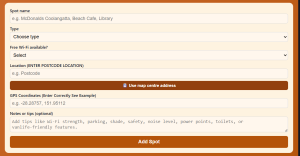
The idea is simple. When you read about a good stop — in this blog, in a forum, on a roadside sign, from a fellow traveller at camp — you copy three pieces of information: the postcode, the latitude, and the longitude. You paste them into the app. The stop is saved to your personal map. Next time you are in that region, you open your map and get directions instantly.
No spreadsheet. No sticky note. No trying to remember which folder you saved the screenshot in. Your stops are in one place, mapped, and ready to navigate to.
Every article on the Retire to Vanlife website includes GPS coordinates for the stops mentioned. You will see a green box like the one above at each stop. It gives you the postcode, latitude, and longitude ready to copy straight into your saved spots. That is the system — read the article, save the stop, get directions when you need it.
| Feature | What It Does | Why It Matters for Seniors |
|---|---|---|
| Save by GPS coordinates | Copy latitude, longitude, postcode to save any stop | No address needed. Coordinates work even for remote spots with no street name. |
| Personal map | All your saved stops in one mapped view | See all your stops at a glance without searching through notes or photos. |
| One-tap directions | Get navigation to any saved stop instantly | Opens directly in Google Maps or Apple Maps — apps you already know how to use. |
| No download required | Runs in your phone browser | No app store, no account setup, no storage space used on your phone. |
| Pre-loaded stops from articles | GPS data provided in every Retire to Vanlife article | Stops are researched and verified — not random crowd-sourced pins of unknown quality. |
3. Why Grey Nomads Need This — Not Just Another Camping App
There are dozens of camping apps available to Australian travellers. WikiCamps, Campermate, GovCamp, Hema Explorer — they are all useful tools for finding camping spots. The Vanlife Savings Spots app is not trying to replace them. It does something different.
General camping apps show you what is available. The Vanlife Savings Spots app saves what you have found, been told about, or read in a trusted source. It is the difference between a shopping centre directory and your personal list of the shops you actually use.
For grey nomads specifically, this distinction matters more than it does for younger travellers. Here is why:
- Your stops are not just camping spots. They are dump points, pharmacies, accessible toilet blocks, flat sealed parking bays, medical centres, RFDS bases, and specific roadside rest areas with wide enough turning circles for your rig. These do not show up reliably in general camping apps.
- Crowd-sourced information goes stale. The demand for camping spots is growing every year, and camping fees and booking rules change constantly. A review left two years ago may no longer be accurate. The Retire to Vanlife articles are regularly updated and every GPS coordinate is checked.
- Too many options is a problem, not a solution. When you are tired at the end of a long driving day, scrolling through 200 pins on a map is stressful. Your personal saved spots — the ones you have specifically earmarked — give you a shortlist you can trust.
- Planning is harder on the road than at home. The days of a devil-may-care approach to turning up at a caravan site and always finding a space have dwindled. Saving stops while you have wi-fi and daylight means you are ready when you do not.
4. How to Save Your First Stop in Under 60 Seconds
This section is the step-by-step guide. Follow these steps exactly once and the system will make sense immediately.
Step 1 — Find a GPS coordinate to save
Every article on Retire to Vanlife includes a green GPS box for each camp or stop mentioned. It looks like the example below. The three pieces of information you need are: the postcode, the latitude, and the longitude.
📍 Save to Vanlife Savings Spots App: Copy the Postcode, Latitude and Longitude below into your Vanlife Savings Spots app to save this stop and get directions.
Example stop — Denham Foreshore, Shark Bay WA
Postcode: 6537 | Latitude: -25.9278 | Longitude: 113.5311
Step 2 — Open the Vanlife Savings Spots app
Go to retiretovanlife.com/vanlife-savings-spots/ on your phone or tablet. If you have bookmarked it to your home screen, tap the icon. The app opens in your browser — no login required.
Step 3 — Enter the three numbers
Type or paste the postcode, latitude, and longitude into the three fields. Give the stop a name you will recognise — “Denham Foreshore Free Camp” is better than “Stop 14.” Add any notes that matter to you: “Self-contained only. 48hrs. IGA 400m. Telstra 4G.”
Step 4 — Save and done
Tap Save. The stop appears on your personal map. Next time you are within range, tap the stop and tap Get Directions. Your navigation app opens with the route ready to go.
5. The 5 Types of Stops Every Grey Nomad Should Be Saving
Most travellers only save camping spots. That is a fraction of what the app is useful for. Here are the five categories that make the biggest difference on a long-distance grey nomad trip.
| Stop Category | What to Save | What to Note | Why It Matters for Seniors |
|---|---|---|---|
| Free Camps | Council rest areas, Main Roads WA stops, Crown Land sites | Time limit, self-contained required?, rig length, surface type | Saves $30–$50 per night. Knowing the rules before you arrive avoids fines. |
| Dump Points | Council dump points, caravan park dump stations, roadhouse facilities | Cost (free/paid), hours, water tap nearby, access for large rigs | Knowing the next dump point lets you plan how long to stay at any free camp. |
| Medical Stops | Hospitals, medical centres, pharmacies, RFDS bases | Emergency hours, phone number, distance from your next camp | In a medical situation, seconds spent searching cost time. Pre-saved is pre-ready. |
| Fuel and Supplies | Roadhouses, supermarkets, LPG refill stations, FuelMap verified cheapest stops | Fuel type available (diesel/petrol/LPG), hours, distance from highway | Running low on fuel 80km from the next servo is avoidable. Save every verified fuel stop between towns. |
| Accessible Facilities | Disabled toilet blocks, level parking bays, low-kerb access points, shower blocks with grab rails | Steps or kerbs present?, door width, surface type, proximity to main facilities | Mobility needs make access non-negotiable. Saving verified accessible stops means you never arrive at a site that will not work. |
6. Logistics: Toilets, Water, and Dump Points — Save Them First
Ask any experienced grey nomad what they wish they had known in their first season and the answer is almost always the same. It is not about the most scenic camps or the best wildlife. It is about knowing where the next toilet is. Knowing when your grey water tank will be full. Knowing where the closest dump point is before you need it urgently.
These are not glamorous concerns. They are the difference between a comfortable trip and a stressful one. And they are exactly the kind of stop the Vanlife Savings Spots app handles best.
What to Note When Saving Toilet and Water Stops
| Facility Type | Key Details to Save | Senior-Specific Notes |
|---|---|---|
| Public toilet block | Open 24hrs or locked at night? Flush or pit? Disability access? | Note if there are steps at the entrance. Many regional toilet blocks have one step — that matters for mobility aid users. |
| Dump point | Free or paid? Water tap nearby? Wide enough bay for long rigs? | A dump point with no adjacent water tap means carrying a separate container. Save this detail to avoid surprises. |
| Potable water tap | Council water (safe to drink) or bore water (not drinkable)? | In remote WA, many taps supply bore water only. Save the distinction — it matters for medications that require clean water. |
| Shower block | Cost per use, token required, hot water available | Note whether there is a bench seat or grab rail in the shower. This is rarely listed in general apps. |
7. Safety: Hospitals, Pharmacies, and RFDS — The Stops That Matter Most
Medical stops are the most important category in the Vanlife Savings Spots system — and the most consistently overlooked. Every grey nomad saves camping spots. Very few save the hospital that is 180km down the road before they need it.
In a medical emergency, your ability to immediately provide a precise location and navigate to help is critical. Searching for “hospital near me” when you have no mobile signal, your partner is unwell, and you are 60km from the last town is not a plan. A pre-saved GPS coordinate is a plan.
Key Medical Stops to Save Before Leaving Each Major Town
| Stop Type | What to Save | Notes Field: What to Write |
|---|---|---|
| Hospital (Emergency) | Exact GPS of the Emergency Department entrance | Phone number. 24hrs? Surgical capacity? Distance from your next camp. RFDS airport if applicable. |
| Medical Centre / GP | GPS of the clinic entrance | Opening hours. Bulk-billing? Appointment or walk-in? Telehealth available? |
| Pharmacy | GPS of pharmacy. Not just town — exact location. | Opening hours, closed Sunday?, dispense scripts from interstate? |
| RFDS Base / Airport | GPS of RFDS base or nearest airstrip | RFDS phone: 1800 625 800. Always say “Shark Bay” / “Pilbara” / region name + your GPS coordinates when calling 000. |
| Telehealth access point | Location with reliable Telstra 4G signal (town centre, roadhouse, etc.) | Telehealth requires a stable data connection. Save the nearest guaranteed signal point on your route. |
8. Mobility: Level Ground, Accessible Sites, and Disability-Friendly Stops
For grey nomads travelling with mobility limitations — whether a walking frame, a bad hip, a knee replacement, or a wheelchair — the difference between a good camp and an unusable one comes down to specific physical details. These details are almost never listed in general camping apps.
When you save an accessible stop in the Vanlife Savings Spots app, include the information that actually matters for your specific needs. A stop that says “great camp, flat ground” is useful. A stop that says “flat sealed surface, no kerbs, drive-through bay fits 36ft rig, accessible toilet 50m with grab rail and step-free entry, lit at night” is genuinely useful.
Mobility Checklist: What to Note for Every Stop
| Mobility Factor | What to Observe and Save | Why It Matters |
|---|---|---|
| Ground surface | Sealed bitumen / compacted gravel / soft sand / grass | Soft sand is impassable for walking frames and wheelchairs. Compacted gravel can be manageable. Sealed is best. |
| Ground level | Flat / slight slope / significant slope. Use a phone level app to measure. | A slope of more than 2–3 degrees affects sleep quality, balance on waking, and blood pressure overnight. |
| Vehicle access | Drive-through or reverse-in? Width of entry? Turning circle? | Reversing a 30ft rig after a long drive is stressful. Drive-through sites are significantly less demanding. |
| Toilet access | Steps? Grab rail? Door width? Distance from parking bay? | A toilet block 200m away on grass is very different from one 50m away on a sealed path. |
| Night lighting | Is the path to the toilet lit after dark? | Falls at night are the number one injury risk for older travellers at camp. Lighting is not optional — it is safety. |
| Nearby hazards | Tree roots, uneven paving, soft edges near drop-offs, ant mounds | Hazards found in daylight can be noted and avoided. Hazards found in the dark cause falls. |
9. When to Use the App: Before You Leave Town, Not After You’re Lost
The Vanlife Savings Spots app is most useful when you use it before you need it. The worst time to search for a free camp is when you have been driving for six hours and you are tired and the sun is going down. The best time is the evening before, when you are relaxed, have good signal, and can take five minutes to load tomorrow’s options.
Here is a simple daily rhythm that experienced grey nomads use:
| Time | Action | Why |
|---|---|---|
| Previous evening | Read next day’s route on Retire to Vanlife. Save all stops mentioned for that leg. | You have wi-fi. You are rested. You can read carefully and save accurately. |
| Morning — last town before remote stretch | Open your saved spots. Confirm the next camp, dump point, fuel stop, and medical centre are all saved. | You still have signal. You can add anything you missed last night. |
| On the road | Passenger opens saved spots and navigates using one-tap directions. Driver focuses on the road. | No searching while driving. No distraction. Everything is already saved. |
| Arriving at camp | Check the camp details in your notes. Confirm self-containment requirements, time limit, surface. | No surprises. You already know what to expect before you unhitch. |
| Evening at camp | Text your location to your contact. Plan tomorrow. Add any stops you discovered today. | Your personal map grows every day. Each trip makes the next one easier. |
10. Senior-Specific Tips for Getting the Most From the App
The following tips are for grey nomads who are new to using GPS-based apps — or who have tried other apps and found them too complicated. The Vanlife Savings Spots system is designed to be simple. These habits make it even easier.
Tip 1 — Add the app to your phone’s home screen
On iPhone: Open retiretovanlife.com/vanlife-savings-spots/ in Safari. Tap the Share button (the box with an arrow). Tap “Add to Home Screen.” Name it “My Stops.” Tap Add. A green icon now appears on your home screen for one-tap access. On Android: Open the page in Chrome. Tap the three-dot menu. Tap “Add to Home Screen.”
Tip 2 — Make your stop names specific and searchable
“Rest area” tells you nothing when you have 40 saves. “Carnarvon Fascine Free Camp — 48hrs — SC only — flat bitumen” tells you everything in one glance. Spend 10 seconds naming stops properly and your map becomes genuinely useful instead of a list of vague pins.
Tip 3 — Save medical stops first, camp spots second
Before every new leg of your trip, save the hospital and pharmacy for the next major town. Do this before saving the camping spots for that region. Medical stops take priority — because you choose when to use a camping spot, but you do not choose when you need a hospital.
Tip 4 — Use the Notes field as your own travel diary
Add notes that are personal to you: “arrived 4pm, left 10am, quiet night, van park attendant Rod was helpful, dump point working well, good Telstra signal all night.” This turns your saved spots into a travel log. Two seasons from now, you will know exactly what to expect when you return.
Tip 5 — Share stops with your travelling companion
If you travel with a partner, both of you should have the app bookmarked and a shared habit of saving stops. If one of you is driving and the other is navigating, the navigator’s saved spots become the trip planner. When one partner is unwell, the other already has all the stops saved and can navigate independently.
11. Telstra Coverage and Offline Use — What You Need to Know
One of the most common questions about any road trip app is: “Does it work when I have no signal?” This is especially important for grey nomads travelling in remote WA, the Kimberley, and outback Australia where Telstra coverage drops out for hundreds of kilometres at a stretch.
The honest answer is this: the Vanlife Savings Spots app is a browser-based tool. It works best with an internet connection. Here is how to make sure your stops are available even when you have no signal:
| Situation | What to Do | Senior-Friendly Method |
|---|---|---|
| Approaching a no-signal zone | Open your saved stops while you still have signal. Leave the page open. | An open browser tab stays visible even without signal. Your saved stops remain on screen. |
| Before leaving the last town with signal | Take a screenshot of your saved spots list. | Screenshot lives in your Photos app — visible anywhere, any time, no signal needed. |
| Very remote areas (no Telstra at all) | Write your key GPS coordinates on a notecard kept in the glovebox. | Old-school backup. Works when phone battery dies, screen cracks, or signal is completely absent. |
| Directions without signal | Download Google Maps offline for your region before you leave town. | In Google Maps: search the region name → tap Download. Offline maps work without any data signal. |
12. Common Mistakes Grey Nomads Make With Camping Apps
After years of travelling and talking with fellow grey nomads, the same mistakes come up again and again. These are the ones worth avoiding from day one.
Mistake 1 — Only saving camping spots
Camping apps are marketed as camping finders. So most people only save camps. But dump points, hospitals, pharmacies, fuel stops, and accessible toilets matter just as much — sometimes more. Broaden what you save and the app becomes a full trip management system, not just a bed-finder.
Mistake 2 — Trusting outdated information without checking
A saved spot is only as good as the date it was verified. Camping rules change. Free camps become paid. Dump points go out of service. Always note the date when you save a stop and add “confirmed [date]” to your notes. When that stop is more than 12 months old, verify it before relying on it.
Mistake 3 — Searching for stops while driving
Any time spent searching for a campsite from behind the wheel is dangerous time. If you have not pre-saved your stops, pull over completely before searching. The Vanlife Savings Spots system eliminates this problem — but only if you do the saving the night before, not on the road.
Mistake 4 — Not noting rig-specific access details
A camp that says “suitable for caravans” could mean a site that fits a 16-foot caravan with a compact tow vehicle. If you are towing a 28-foot van with a full-size 4WD, that description is meaningless. Always note turning circle, site length, and entry width in your saved stop notes.
Mistake 5 — Not backing up your saved spots
Phone screens crack. Batteries die. Apps reset. If your saved spots only exist in one place, you are one dropped phone away from losing them. Screenshot your list at the end of each week of travel. Email the screenshots to yourself. Your trip planning investment is then protected.
13. Your Quick-Start Checklist: First 10 Stops to Save Right Now
If you are new to the Vanlife Savings Spots system, start here. These are the first ten categories of stop to save before your next trip. Use the GPS coordinates from any Retire to Vanlife article to fill each one.
📥 Save This Checklist — Print or Screenshot It Before Your Next Trip
Use Ctrl+P (Windows) or Cmd+P (Mac) to print. Or screenshot this section on your phone and save it to your Photos app for offline access.
| # | Stop to Save | What to Include in Notes | Done? |
|---|---|---|---|
| 1 | Nearest hospital to your first night’s camp | Emergency phone number, 24hrs, distance from camp | ☐ |
| 2 | Nearest pharmacy to your route’s first major town | Opening hours, can fill interstate scripts? | ☐ |
| 3 | First free camp on your route | Time limit, SC required, surface, rig length, toilets | ☐ |
| 4 | First dump point after your first free camp | Free or paid, water tap, rig access, hours | ☐ |
| 5 | Last fuel stop before your first remote stretch | Fuel type, distance to next servo, hours | ☐ |
| 6 | RFDS base nearest to your most remote planned camp | 1800 625 800. Nearest airport/airstrip GPS. | ☐ |
| 7 | Best accessible toilet block on first day’s drive | Steps? Grab rail? 24hrs? Surface type? | ☐ |
| 8 | Your emergency contact person (name + phone) | Text them your GPS every evening. Check-in time: 7pm. | ☐ |
| 9 | Main Roads WA rest area on Day 1 highway leg | 24hr limit. Surface. Toilets? Generator rules? | ☐ |
| 10 | Backup camp if your first choice is full | Always have a Plan B saved. Note distance from Plan A. | ☐ |
Ready to Start? Save Your First Stop Now.
Go to retiretovanlife.com/vanlife-savings-spots/
Bookmark it. Add it to your home screen. Save your first stop tonight.
Every article on this site gives you the GPS coordinates to get started.
No app download. No account needed. No spreadsheets. Just your map, your stops, your trip.
Note: GPS coordinates and camp details referenced in Retire to Vanlife articles are verified at time of publication and updated regularly. Camping rules, fees, and access conditions change. Always confirm current conditions with the relevant shire or land manager before arrival. The Vanlife Savings Spots system is a personal planning tool — it does not replace your own on-the-ground observation and judgement.
FOR USA VISITORS

As an affiliate, I earn from qualifying purchases at no extra cost to you.